CPCSyntaxError

thanks..claude works fast!..im pushing it to make the best emu around… take whatever you need to make yours better! … i already have some CRTC/GA emulation better than Amspirit and closer to hardware.. and audits on all the chips (z80, PPI, FDC, AY etc) has been fixed and completed today, passing with flying colors…

i should have some more fixes coming soon :grinning_face:

2 Likes

Could we get a release build for macOS?

it “should” be simple to compile on macos…instructions are in the github readme

i havent got access to a mac so cant compile for it… i can try using github actions but i have no idea how it works! and it will not be tested…

there is macos and linux binaries available now…

v0.6.0: packages for Windows, Linux and macOS, monitor hold controls, CRTC sync timing from the Compendium

New: packages for Linux and macOS

GitHub Actions now builds the emulator for three systems. Each release has these packages:

System Package
Windows (64-bit) CPCSyntaxError-win64-v0.6.0.zip
Linux (x86_64) CPCSyntaxError-linux-x86_64-v0.6.0.tar.gz
macOS 10.15 or later (Apple silicon and Intel) CPCSyntaxError-macos-universal-v0.6.0.zip
  • Linux: install SDL2 from your distribution (for example sudo apt install libsdl2-2.0-0), then run ./cpcse. README-LINUX.txt gives the package names for Fedora and Arch.
  • macOS: one app for Apple silicon and Intel Macs, with SDL2 inside. The app does not have an Apple Developer ID signature. The first time, right-click CPCSyntaxError.app and select Open, then select Open again. Keep the app in a folder that you can write to, because it keeps its settings inside the app.
  • We did not test the Linux and macOS packages on a desktop yet. Please report a problem on the Issues page.

New: H. Hold and V. Hold controls on the monitor

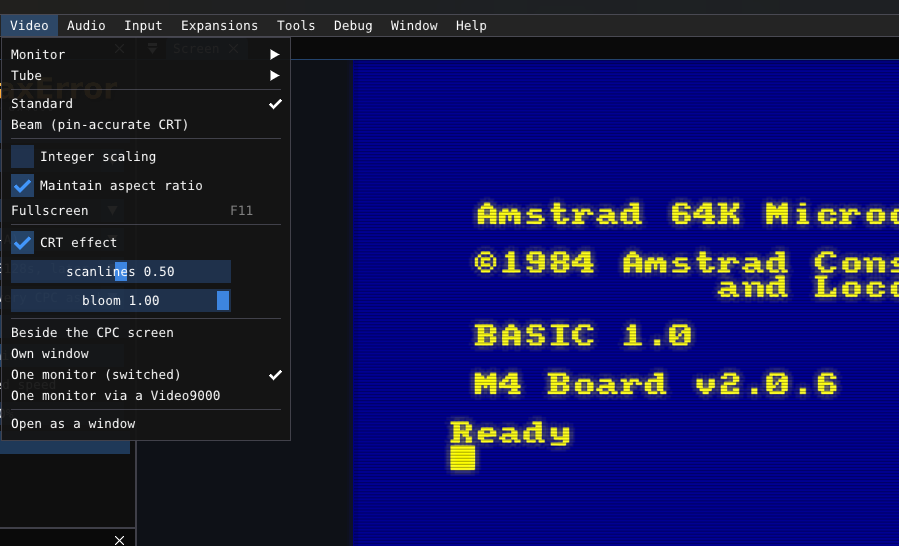
The CTM and GT monitors have Hor. Hold and Vert. Hold pots on the back. Video → Monitor now has the same two controls.

  • V. Hold moves the vertical lock range. Turn it too far and the picture rolls.
  • H. Hold moves the horizontal lock range. Turn it too far and the picture breaks into diagonal bars, as on a real monitor that is out of hold.
  • Centre both sets the default again. At the default, the picture is the same as before.
  • The settings file keeps the two values. In headless runs, use --hhold -79..79 and --vhold -50..50.

Changed: CRTC sync timing

  • CRTC 0, 1 and 2: the HSYNC pin now falls 2/16 µs after the character boundary. This is the only value that agrees with both tables of the Compendium (§14.4, p.134 and p.52). Some SHAKER screens now match the photos of a real CPC more closely. This closes the known issue about the C-HSYNC width.
  • CRTC 1: the RFD trigger tests R9 as the chip does, and the video pointer latches the MA counter (Compendium §17.1).

Fixed

  • Assembler (RASM) on Windows: two compressor functions did not have declarations in the MinGW build. The compiler used the wrong result type for them. Newer compilers stop with an error.
2 Likes

I would suggest, for linux builds , to tell Claude to generate flatpaks. The flatpak format is cross-distro and well supported

1 Like

tbh i wasnt going to include linux… its really simple to compile from source…but i had the binary already built so why not?!..

im looking for suggestions for additional features or expansions to be added…

i think i might model a CMOS z80 aswell… just to show the differences in an emulator.. and maybe help steer new software to check for it and code around the differences, being that the NMOS chips are getting harder and harder to source…

for shits n giggles i added the V and H sync knobs on the monitor in the last version… but im going to add brightness and contrast (on the models that have contrast!).. and may add color sliders so you can match the colors perfect with a real monitor (im not going to bother doing that myself!)

im also thinking about adding DSK to ROM and CPR building tools…

i added CMOS z80 for testing purposes…added the 128K mod for GX4000, and added the extra controls for monitor and color tweaking… also some gui fixes.. now you can break out any settings item to its own window, allowing you to keep just audio settings on screen for example.. and of course the flatpak build for linux as asked for!

v0.6.1: Flatpak for Linux, monitor Brightness and Contrast, colour matching per monitor, CMOS Z80, GX4000 128K mod

New: a Flatpak for Linux

Each release now has four packages:

System Package
Windows (64-bit) CPCSyntaxError-win64-v0.6.1.zip
Linux (x86_64) CPCSyntaxError-linux-x86_64-v0.6.1.tar.gz
Linux (x86_64), Flatpak CPCSyntaxError-linux-x86_64-v0.6.1.flatpak
macOS 10.15 or later (Apple silicon and Intel) CPCSyntaxError-macos-universal-v0.6.1.zip

To install the Flatpak (the first install gets the freedesktop runtime from Flathub):

flatpak remote-add --user --if-not-exists flathub https://dl.flathub.org/repo/flathub.flatpakrepo
flatpak install --user CPCSyntaxError-linux-x86_64-v0.6.1.flatpak

Then start CPCSyntaxError from your applications menu.

  • The Flatpak keeps its settings, screenshots and ROM folder in ~/.var/app/io.github.wackedman.CPCSyntaxError/data/cpcsyntaxerror. It copies the shipped ROMs there on the first start.
  • It can open files in your home folder.
  • We did not test the Flatpak on a desktop yet. Please report a problem on the Issues page.

New: monitor front controls

Video → Monitor has the controls of the real monitors:

  • Brightness on every monitor set.
  • Contrast on the monochrome sets (GT64, GT65 and MM12), as in their service manuals.
  • The GT green tube has a green phosphor colour. It is a best guess from the P22 green phosphor data.
  • The green screen picture comes from the LUM signal, mixed with the weights of the resistors in the service manual schematics (G:R:B = 330:100:33).
  • In headless runs, use --brightness 0..100 and --contrast 0..100.

New: colour matching for each monitor set

Video → Monitor has an R, G and B output intensity (0 to 200 %) for each monitor set. Use them to make the picture match your real monitor. The emulated colours inside the machine do not change. The settings file keeps the values for each set. In headless runs, use --intensity R,G,B.

New: CMOS Z80

Machine → Z80 selects the NMOS Z80A that every CPC shipped with (the default), or a CMOS Z84C00 that some repaired machines have. On a CMOS Z80, OUT (C),0 sends &FF, which changes the music of some programs. LD A,I does not have the interrupt fault. Use it to compare with a real machine. In headless runs, use --z80 cmos.

New: GX4000 128K RAM mod

Machine → RAM on a GX4000 has 128 KB (RAM mod). It banks the RAM like a 6128, so 128K software runs on the console. A change restarts the cartridge. In headless runs, use --gx4000-128k.

Changed: settings windows

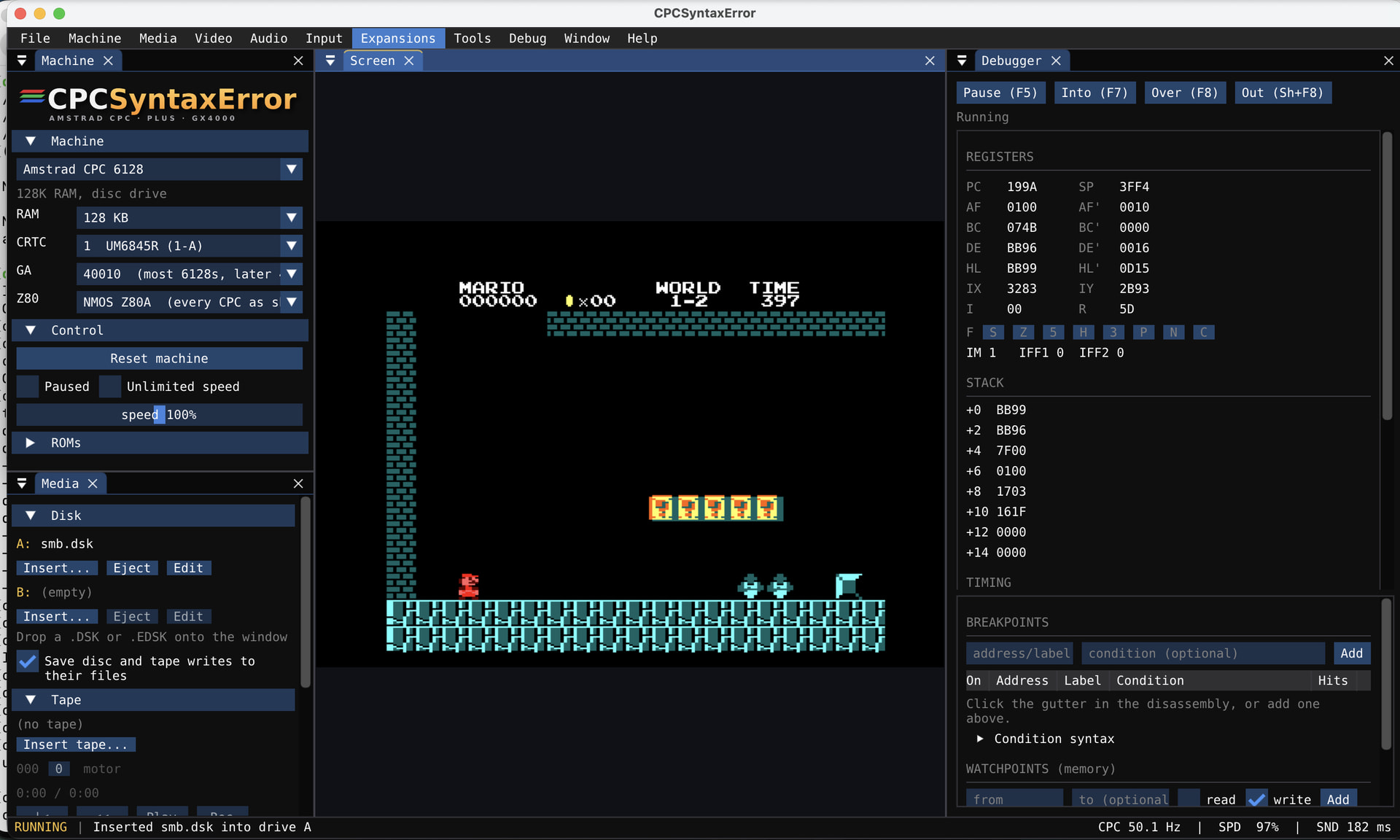
  • The settings are now five windows: Video settings, Audio settings, Input settings, Expansions and External debugging. You can drag each one out and dock it anywhere.
  • The monitor settings moved to Video → Monitor.
  • Every file dialog opens in the folder it used last time.

I’ve largely ignored 128K GX mods because I don’t see the point, but out of curiosity do they behave like an actual 6128+ or like an old school, non Plus-aware, memory expansion added to a Plus?

im not exactly sure ..dont have a gx4000 or plus machine!.. but i converted a 128K demo (logon’s system) to CPR and booted it fine, where it would crash with just 64K

1 Like

Yeah, it’s a very subtle nuance when expanded RAM is paged at #4000 and then the ASIC is enabled and written to. Old RAM expansions don’t understand and so mirror the write to RAM. I suspect the hacks do it like a Plus, but it would be curious to find out.

1 Like

Is it my idea or is bloom buggy?

1 Like

i will look into fixing the expansion ram for plus systems… edit: testing it will be another issue, need to find a 128K or more Plus game or demo of some sort i guess… when i booted Noels Diag on the emulated GX4000 with 128K, it reported 128K and would test 64K expansion

yes! the scanline bloom was scaled from the centre of the screen instead of from the glowing pixels! expect a fix!.. the new effect is subtle..

2 Likes

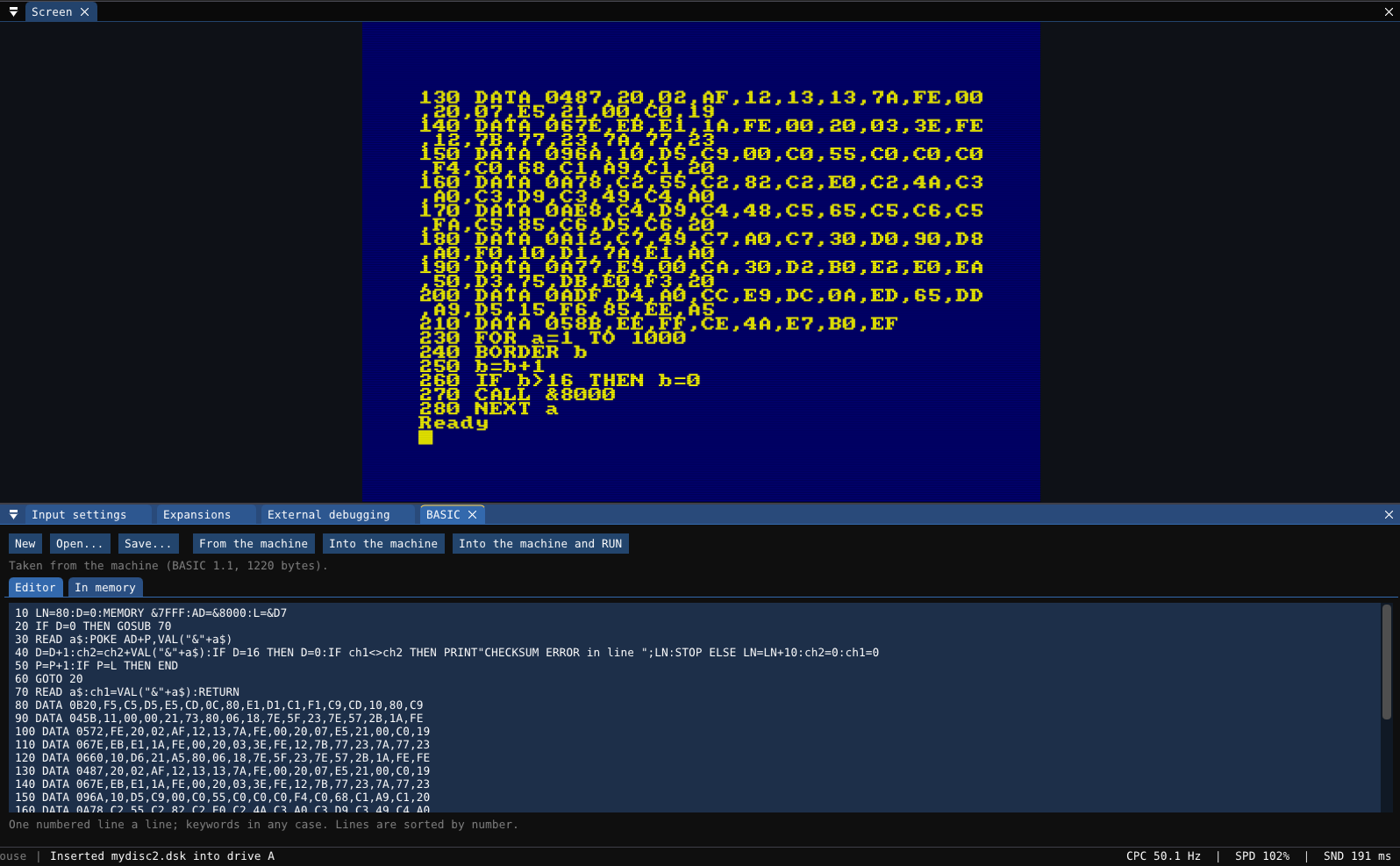
added a BASIC editor… works both ways, can pull a BASIC listing from memory, or can inject it into memory!..aswell as the other fixes and added the 664 to complete the machines.. the Plus has an extra option at the bottom of the ram size list for internal or external ram, it seems when its installed internally it doesnt write to ram when the ASIC is unlocked, but external ram expansions do (im not sure if there are specific ram expansions for the Plus machines)

v0.6.2: CPC 664, the BASIC window, the Plus from its ROMs, classic RAM boards on the Plus, windows that fit when narrow

New: CPC 664

The CPC 664 is a new model (Machine → Model, or --model cpc664): a disc drive and AMSDOS, 64K, and the 40010 Gate Array (the Compendium shows that the 664’s board takes only the 40010). Its OS, BASIC and AMSDOS ROMs are in roms/.

New: the BASIC window

Tools → BASIC is next to the assembler.

  • From the machine lists the BASIC program in memory into the editor. The In memory tab shows a live listing.
  • Into the machine puts the editor’s program into memory at once, as if it had been typed. Into the machine and RUN also types RUN. BASIC must be at its Ready prompt.
  • Open and Save use text files (.bas, .txt).
  • The tokenizer is checked byte for byte against Locomotive BASIC 1.0 and 1.1 on the 464, 664 and 6128: 52 lines of tricky BASIC each give the same bytes as the real ROM.

Changed: the 464 Plus and 6128 Plus start from their ROMs

A Plus computer now starts from the Plus OS and BASIC ROMs in roms/, not from the GX4000’s Burnin’ Rubber cartridge. The 6128 Plus also uses its own AMSDOS 0.7. The dump called “Amstrad CPC 464+ Plus A2 OS” is in fact this AMSDOS 0.7 (the same bytes as page 3 of the system cartridge).

  • The 464 Plus goes straight to BASIC.
  • The 6128 Plus shows AMSDOS 0.7’s own menu, as the real one does: f1 for BASIC. f2 (Burnin’ Rubber) needs the game, which is only in the cartridge.
  • The GX4000 still starts the system cartridge. Without the ROM files, a Plus also starts the cartridge, as before.

New: classic RAM boards on a Plus

A RAM board on the expansion port does not know the Plus’s ASIC. When it has its RAM paged at &4000 and the ASIC page is in, a write goes to the ASIC and to the board’s RAM, as on the real machine. The Plus’s own RAM does not do this. Machine → RAM on a Plus has the choice “Expansion: a classic board” (the default) or “an internal upgrade”. In headless runs, use --plus-expansion internal.

Changed: windows fit when they are narrow

Every window and every tab now keeps its text and buttons inside its width down to 300 pixels: text wraps, rows of buttons break, wide boxes get narrower, hex views show 8 or 4 bytes a row, and the Debugger and the DSK editor put their side panes above each other.

Changed: monitor Brightness on the green and paper-white sets

On the GT 64, GT 65 and MM12, Brightness now goes much higher. Turn it up and the blue paper of BASIC becomes a lit green, as on these sets (their video stage is DC coupled, so the knob moves the black level).

Fixed

  • CRT bloom: the glow moved up and to the left (down and to the right in the other half of the screen). It now spreads evenly round each pixel and adds light.
  • BASIC listings: 15 functions from BIN$ to VPOS were shown under the wrong name (for example LEFT$ as INSTR), also in the DSK editor’s BASIC view.
  • Plus RAM: a Plus computer lost its RAM expansion when you inserted a cartridge.
2 Likes

I’ll try and find some time during the week to build a cart that can test if ASIC writes bleed into the expansion RAM. I don’t think it should be that hard to do.

1 Like

Thanks for the macOS version, it works great!

3 Likes

a quick update… to include RGB offset slot mask option instead of scanlines..you should be able to tune the effect to your liking.. and a few GUI window changes to make things a little nicer..

v0.6.3: the slot mask of the colour monitors, media and ROMs in windows of their own

New: the slot mask

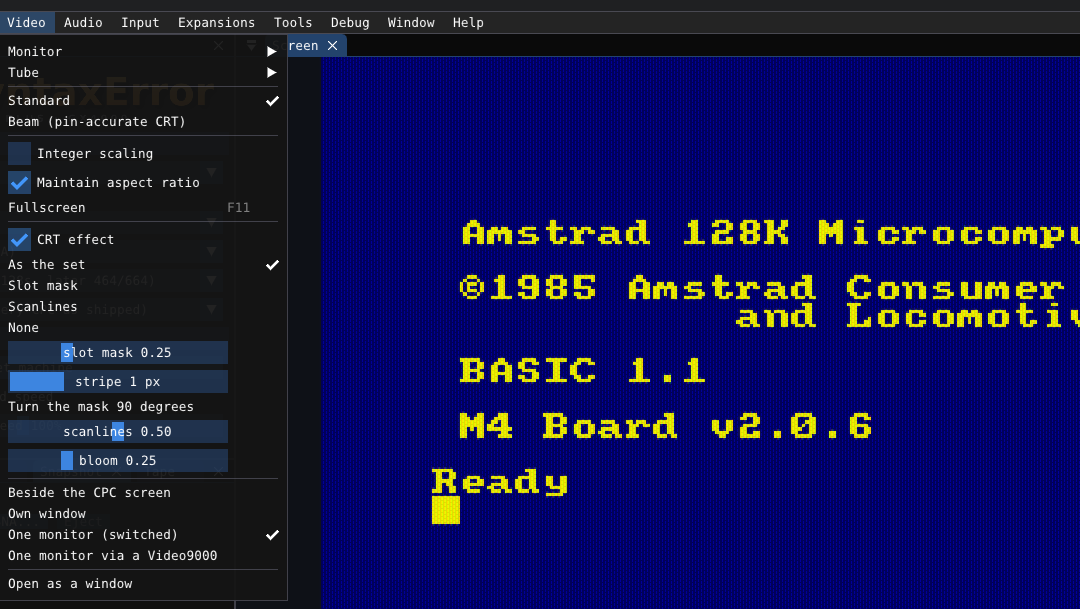
The CTM 644’s tube (3701B22) is a slot-mask tube. Video → CRT effect now shows the tube’s own pattern:

  • As the set (the default): the colour sets (CTM 640/644, CM14) show their slot mask. The green and grey sets (GT 64/65, MM12) show scanlines.
  • In the slot mask, each slot lets the three beams onto a red, a green and a blue phosphor stripe. Each phosphor slot lights as a whole, in its own colour only, at the average of that colour in the picture. No slot is ever half lit. Neighbouring slots are offset by half a slot, as on the tube.
  • slot mask sets the strength (at 1.0 you see only the slots). stripe sets the width of one phosphor stripe on your screen (1 to 4 pixels). Turn the mask 90 degrees turns the stripes across.
  • You can also choose Slot mask, Scanlines or None for every set.
  • The program drives the slots harder to keep the picture about as bright, as the tube’s beams do.

Changed: windows

  • Media is now four windows: Discs, Tape, Cartridge and Snapshot. By default they are tabs where the Media window was. You can dock each one anywhere (Window → Media).
  • ROMs is now a window of its own, a tab beside Machine by default (Window → ROMs).
  • A layout saved by an older version places the new windows the first time they open.

added a tape fastloader slider… allowing you to change baud rate and pulse length on the fly (up to 3500) and also added a tape instant loader, that pushes the CDT blocks directly into memory… added a blur slider for video aswell, softens the edges of text to look more like real CRT

v0.6.4: tape fast loading and instant loading, CRT blur

New: tape fast loading

The tape window has a new Fast loading setting. It is on by default.

  • The blocks that the CPC firmware reads play faster, at a speed that you set: 1000 to 3500 baud (default 3000). The slider also shows the length of the “0” pulse for that speed.
  • Each tape has its own speed, so each block gets its own factor. At 3000 baud, a block at 1000 baud plays 3 times faster, and a block at 2000 baud 1.5 times faster. A block that is already as fast plays as it is.
  • The emulator decides for each block. A block plays fast only when:
    • it is in the firmware’s own format, with good checksums, and
    • the firmware’s ROM reads it. The start of each block plays at its own speed while the emulator checks this.
  • A block that a custom or protected loader reads plays at its own speed.
  • The list of blocks shows the decision: [fast], [normal: own loader], [already fast] or [instant].
  • The limit is measured: the firmware of the 464 and the 6128 reads a “0” pulse down to 330 T-states (about 3500 baud) and fails at 320. If a tape does not load, set a lower speed.
  • The counter, the time and the block shown stay correct during a fast block.

New: instant loading

Instant is a second setting in the tape window. It is off by default.

  • When the firmware reads a block, the bytes of the block go into memory at once. The 2-second wait for the motor between blocks is also gone.
  • You do not see border stripes and you do not hear the tape.
  • A block that is not in the firmware’s format plays as it is, so custom and protected loaders work.
  • It works with the OS ROMs of the 464, the 664, the 6128 and the 464/6128 Plus.

New: CRT blur

Video → CRT effect has a blur slider. It softens the edges of the pixels, as the round spot of the beam does on a tube. It also works with the slot mask.

Headless

--tape-fast <baud>|instant|off sets the fast loading. At the end, the emulator prints the decision for each block.

Fixed

  • The slot mask and a memory view used the same picture slot. Each could show the picture of the other one.

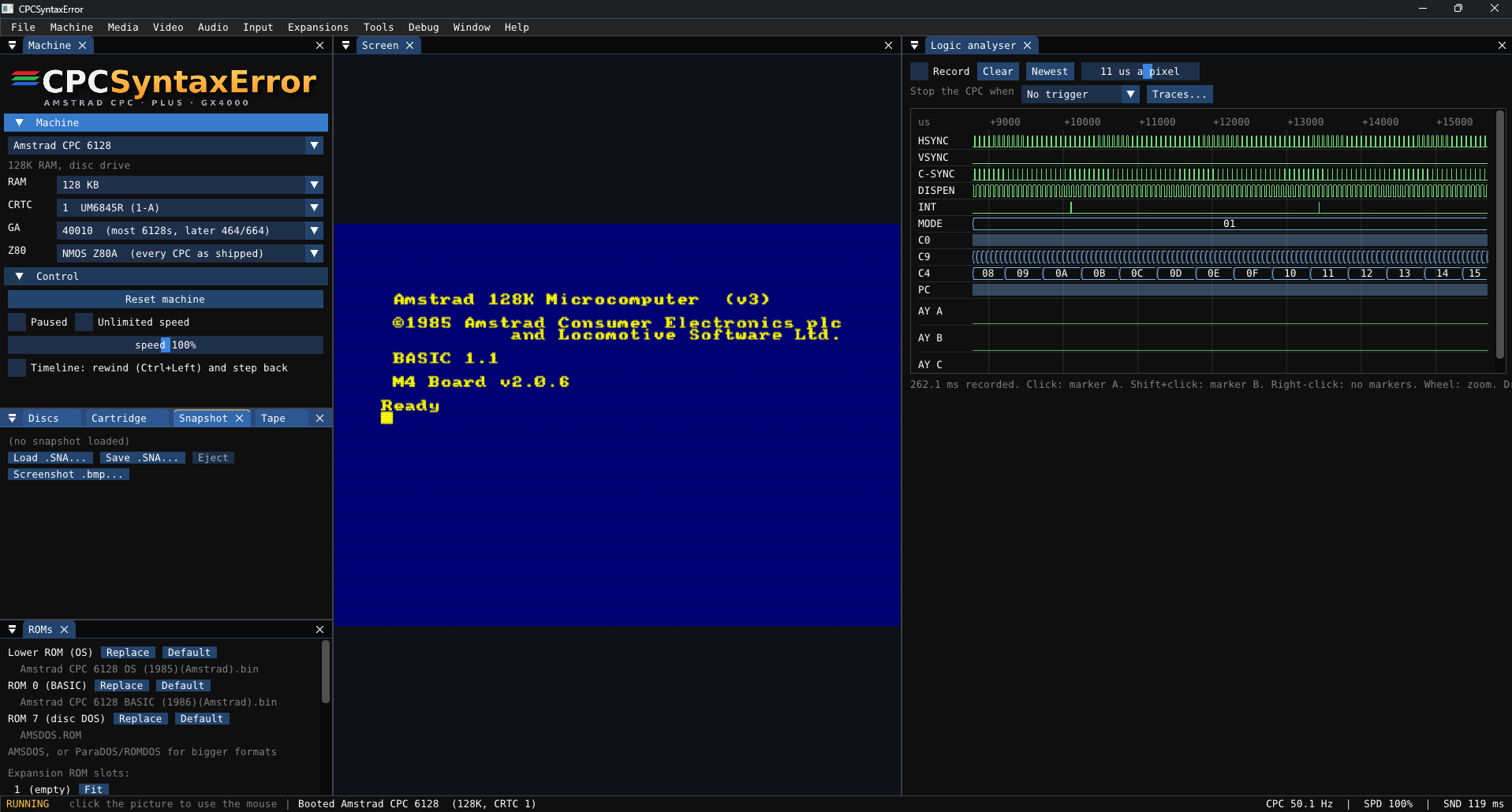
i added some new bits, a logic analyzer, reverse debugger, rewind, input recording/playback. and some fixes to help speed up emulation.. also added a new slotmask option..

v0.6.5: more than twice as fast, logic analyser, rewind and step back, input movies

Faster, with the same emulation

  • The emulation is more than twice as fast: a CPC 6128 runs at about 5.7 times real time (it was 2.2), 4.3 times with a picture every frame (it was 1.95).
  • Unlimited speed now runs frames for 30 ms for each picture and does not wait for the display, so the CPC gets more of the time. The slot mask and the blur use several threads.
  • Nothing in the emulation changed: all 2166 SHAKER 2.7 screens are identical to the last version on all five CRTCs, and every check passes.
  • Windows that are closed cost nothing.

Fixed: discs of 80 tracks

  • A disc with more than 43 tracks is now in an 80-track drive (3.5" or Gotek). Before, every drive stopped at track 42, and Batman Forever’s one-disc version hung after “WE ARE PROUD TO RETURN TO YOUR SCREEN” (the music went on).

New: the logic analyser (Debug menu)

  • The machine’s signals as traces, one sample a microsecond: HSYNC, VSYNC, C-SYNC, DISPEN, INT, HALT, the cassette motor and input, the disc controller’s interrupt, the Gate Array mode, the CRTC counters (C0, C4, C9, MA, R52), the Z80’s PC and the three AY channels.
  • Zoom with the wheel and drag to move. Click for marker A, Shift+click for marker B: the time between them is shown. Hover a sample to see all its values and the instruction there.
  • A trigger stops the CPC when VSYNC, HSYNC or INT rises, when the mode changes, or when the PC reaches an address.
  • It records only while its window is open.

New: back in time

  • The timeline keeps a snapshot of the machine every second and every input since (Machine window, on by default, with a memory budget).
  • Ctrl+Left goes a second back; hold it to go on.
  • In the debugger: Back (Shift+F7) one instruction, Frame back, Run back (Shift+F5) to the last time a breakpoint was hit, and Last write to an address: the instruction that last wrote it.
  • The snapshots are exact: from one, with the same inputs, the machine runs the same, instruction for instruction. Running on after going back replays the inputs as they came, until you press something new.
  • A reset is an input like any other. A change of the machine or its media, or an edit in the debugger, starts the timeline again. The M4, OPL4, IDE, serial and speech cards are not rewound, nor what is written to a disc.

New: input movies (Machine → Movie)

  • Record from power-on: the machine is reset, the disc drives and the tape are set as at power-on, then every key, joystick, mouse and tape button is recorded. Stop and save writes a .cpcmovie file.
  • Play: with the same machine and media, the movie is the same run. A check every second shows that it stays in step, or where it went out of step.

New: raster timing overlay (Debug menu)

  • A tick on the picture where each OUT was made, as the beam swept it: CRTC register select and data, Gate Array pen, ink, mode/ROM and RAM bank, PPI/AY, and the Plus palette. A legend is shown on the screen.

New: soft slot mask

  • Video → CRT effect → Soft slot mask: each pixel keeps its colour whole under fine dark lines, as ACE-DL draws a CTM. The slot mask of 0.6.3 stays as it was.

EDIT: cant post more than three consecutive replies… so i have to edit this post to provide the latest update info…

todays update has a lot new bits!..

v0.7.0: quick save slots, video recording, on-screen CPC keyboard, profiler, graphics finder, real joypads

New: quick save slots

  • Nine slots for each program (the disc, tape, cartridge or snapshot you loaded last). Ctrl+1 to Ctrl+9 load a slot, Ctrl+Shift+1 to Ctrl+Shift+9 save it.
  • Each slot is a .sna file and a small picture in states/<program>/, so the slots stay from one session to the next. In the same session, a load gives back the machine exactly.
  • File → Quick save / Quick load show the date of each slot and its picture. The Snapshot window shows the nine slots as pictures with Save and Load buttons.
  • Undo the last load gives back the machine as it was before the load.

New: video and sound recording (File → Record)

  • Video and sound (.avi), in one of two formats:
    • MJPEG: most players play it, Windows’ own player too. About 4 MB a second.
    • ZMBV, lossless: every pixel exact, and only the changes are kept, so the files are small. VLC, ffmpeg and video editors play it; Windows’ own player does not.
  • Sound only (.wav).
  • Every frame is recorded at the CPC’s own rate (50.08 frames a second), also at unlimited speed. The status bar shows the time and size while it records. A file is split at 1 GB.
  • From the command line: --record file.avi (or .wav) and --record-format zmbv.

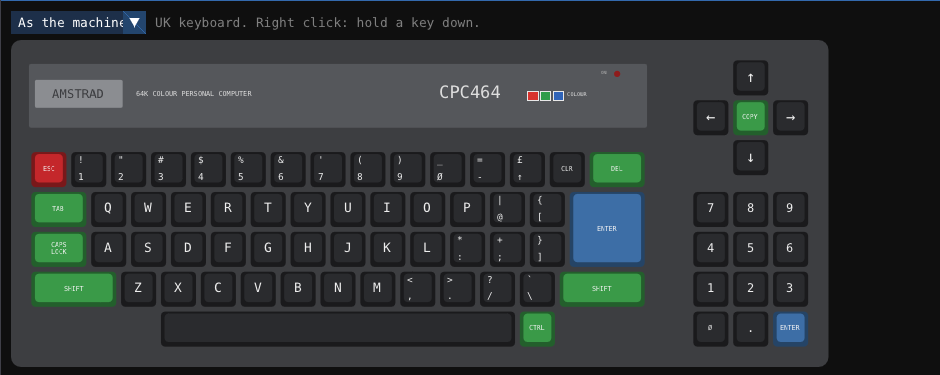
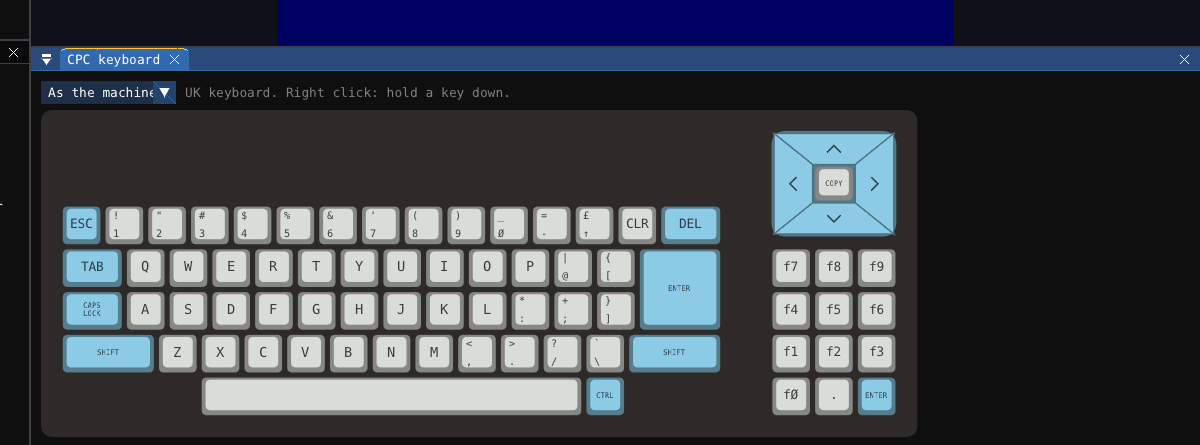
New: on-screen CPC keyboard (Input menu, or Window menu)

  • The keyboard of the machine in use, drawn from photographs of the real machines: the 464 (black keys, red ESC, green and blue keys, the cursor cross round COPY), the 664 (grey and light blue keys, the diamond cursor pad), the 6128 (beige keys, the L-shaped RETURN) and the 464 Plus / 6128 Plus (their cream case and cover). You can also select a different look.
  • The legends follow the CPC keyboard you selected: UK, French or Spanish.
  • A key lights while the CPC sees it pressed, from any source. Click a key to press it. Right-click a key to hold it down (for SHIFT or CONTROL with another key); right-click it again to release it.

New: code profiler (Debug → Profiler)

  • Press Record, let the program run, then press Stop. The profiler shows where the Z80’s time went:
    • Routines (entered by a CALL, an RST or an interrupt): calls, their own time and the time with what they call, as a percentage and in microseconds a frame;
    • the busiest instructions;
    • a map of the 64K.
  • The Debugger’s disassembly shows the time of each line as a bar.
  • It records only while its window is open. When it is off, the emulation is the same.

New: graphics finder (Tools → Graphics finder)

  • Memory shown as CPC graphics, to find sprites, fonts and screens: mode 0, 1 or 2, or Plus sprite data. It can read the CPU’s memory, all the RAM, or the Plus sprite RAM.
  • Set the width and height until the graphics line up. Select a linear layout (sprites) or the CPC screen layout. Screen shows the screen as the CRTC shows it now.
  • Click a tile to select it, then save it as a PNG or copy it as db lines for an assembler.

New: real joysticks and joypads

  • Each CPC joystick takes the controller you select (or the first and second one connected). Every button and direction can be redefined (Input → Joysticks and buttons…), and a light shows each line as you press it.
  • On a Plus or GX4000, each joystick can be Digital or Analogue (Plus): the stick goes to the Plus analogue port.
  • A device with a hat (a d-pad) now uses only the hat for its directions, so the pedals of a racing wheel no longer hold a direction down.

New: CPC or PC keyboard layout

  • Input → Keys: the CPC layout (each key by its position) or the PC layout (each key types its character on the CPC). The CPC keyboard can be UK, French or Spanish.

Also

  • File → Recent files: the last 12 discs, tapes, cartridges and snapshots.
  • The version shows in the title bar and in the About window. The About window and the README name the author.
  • The timeline no longer copies the GFX9000’s pictures into its snapshots. Before, these copies could take gigabytes of memory.
4 Likes

CPCSyntaxError v0.7.1

This release fixes a memory leak. Please update.

Fixes

  • Memory leak in the CRT effects. With the CRT effects on, the memory use grew all the time (users saw 17 GB). Each frame made new worker threads for the effects, and each thread kept its memory. The effects now use one set of worker threads for all frames. Measured: the memory stays at 160 MB after 5 s and after 45 s with all effects on.
  • The timeline is off by default. Turn it on in the timeline settings if you want rewind and step back.

Chip accuracy (SHAKER 2.7)

  • CRTC 1 status register (&BE00 bit 5). The bit changed one line too late. It now changes when C0=R0 ends and uses the next line’s counters (ACCC 21.3.3). SHAKER BS now prints the same values as the real CRTC 1 photo.
  • CRTC 0 and 2, vertical adjust. C4 steps to R4+1 at the start of the adjustment only if C9=R9 at the end of the line (ACCC 13.2.1 and 12).
  • CRTC 0, R7 write. A VSYNC is blocked only if R7 is written at C0<2 (ACCC 11.5.2).
  • CRTC 0, R3=0 in the first microsecond of HSYNC. The HSYNC stops early and the GATE ARRAY draws black on Pixel-M2 4 to 7 (ACCC 14.4.4).
  • R3 JIT stop. The HSYNC now stops in the same character as the write. The black bar in SHAKER BI is no longer one character too wide.
  • GATE ARRAY mode latch. The mode change at the end of HSYNC lands one microsecond later when R3 >= 6 (ACCC 9.3.2 / 9.3.3). SHAKER AE now reaches marker 08 on CRTC 0/1/2 and 09 on CRTC 3/4.

EDIT


doing some more work on the CRTCs to get them closer… wont be another update till next weekend..

CPCSyntaxError v0.7.2

This release makes the CRTC, the GATE ARRAY and the monitor more accurate. The changes come from the SHAKER 2.7 screens that were compared with photographs of real CPCs.

Monitor

  • A line sync that comes late now moves the picture. Before, the monitor followed a sync that moved earlier, but it ignored a sync that moved later. Now it follows both.
  • The monitor follows the mean position of a moving sync. Each line, it moves by one quarter of the phase error. When R2 changes on alternate lines, the picture goes to the mean of the two positions with a small zig-zag. The real CTM photos of SHAKER D7 show the same.
  • Smooth return after a band of double syncs. After the band, the picture comes back over about 8 lines with a rounded corner, as on the real photos of SHAKER D3. Before, it jumped back in one step.

CRTC

  • CRTC 2: an overflowing C4 keeps the BORDER. When C4 passes R4, counts to 127 and goes back to 0, the display stays off until a new frame starts (ACCC 16.4.3 and 18.2.2). SHAKER B4 F, G and H now show the border, as the real CRTC 2 does.
  • CRTC 1: additional lines with R4=0. The C4=R4 state is cleared when the additional lines start. Before, the frame did not end. SHAKER DE/D now prints “WELL DONE”, and the CE tests still end their R5=0 deadlock correctly.
  • All chips: R6 on the adjust entry line. When C4 steps to R6 at the start of the additional lines, the BORDER starts at once (ACCC 18.2.2).
  • Interlace: VSYNC half line on an R7 write. A live R7 write before C0=R0/2 also starts the VSYNC in the middle of the line, with the parity of the current field.
  • CRTC 0 and 2: the black bar after an R3 JIT stop ends on the same Pixel-M2 as the SHAKER references.

GATE ARRAY

  • No C-HSYNC when the HSYNC stops too early. On a CPC GATE ARRAY, if the CRTC HSYNC ends before the C-HSYNC can start, there is no C-HSYNC on that line (ACCC 16.2.2). This removes a wrong bend where the colour zones join in SHAKER AR.
  • Mode change after a short HSYNC. After an R3 JIT stop or a cut short HSYNC, the new mode starts one character earlier, and a mode change can now fall in the second byte of a character. SHAKER BI now matches the photos.
  • VSYNC black per character. The black during the GATE ARRAY VSYNC (V26) is now applied character by character. SHAKER DT bands now start and end on the correct character.
1 Like