BASIC Hovercards

Soooo following the Firmware Hovercards and after @Devlin 's suggestion, I went ahead and implemented similar hovercards for BASIC keywords!

Due to their similarity to natural language I had to limit them to code blocks only:

10 MODE 1: BORDER 0: CLS
20 INK 0, 0: INK 1, 26: INK 2, 6
30 ENV 1, 5, 1, 5: SOUND 1, 239, 50, 12, 1
40 ORIGIN 320, 200: DEG
50 FOR a = 0 TO 345 STEP 15
60   CALL &BD19: REM Sync to vertical flyback
70   DRAWR 100 * COS(a), 80 * SIN(a), 1
80   MOVER -100 * COS(a), -80 * SIN(a)
90 NEXT a
100 LOCATE 1, 24: PRINT "Press any key to reset palette...";
110 CALL &BB18: REM Wait for keypress
120 CALL &BC02: REM Reset inks to defaults

Ta-daaaah!

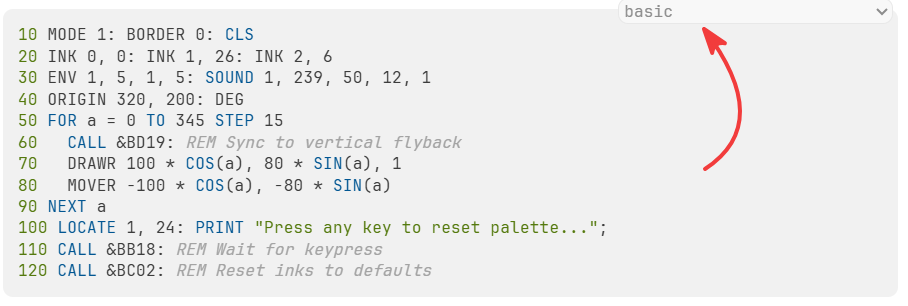
In order for this to work, though, I also had to make sure it only works in BASIC code blocks. And although I have tried to make the forum system to automatically identify BASIC in preformatted text, this doesn’t always work (I should deal with it at some point). So, make sure you choose BASIC when entering a BASIC program:
And that’s it.

Feeback is always welcome!

PS this was much easier to do than I’d originally thought, due to the work on the FW parser and the BASIC code blocks having already been done. That said, the biggest hurdle was scraping the BASIC commands from the wiki itself, because of anti-bot protection :joy:

PS2 Sources used to put together the BASIC outline:

  1. Locomotive BASIC Reference Manual (Used for exact statement syntax, parameter brackets, and version differences (BASIC 1.0 vs 1.1).
  2. AMSDOS Firmware & Reference Manual (Soft 158): Used for the 13 native Resident System Extension (|) disc commands, drive switching, and syntax parameters.
  3. CPCWiki Locomotive BASIC Category: documentation and ROM token tables used to verify edge-case commands (like COPYCHR$ and WINDOW SWAP) and hardware register interactions.

…fed into Gemini which spewed out the json needed for the parser.

Absolutely brilliant!

Just wondering though… is it possible to somehow list the parameters for BASIC’s functions when hovering over them?

ENV is a good example of a command with several parameters.

Yes, that’s doable. Not only ENV but also,ENT and SOUND. Any other commands that take multiple sub-parameters?

I’m planning to add an itemized parameter breakdown to the hovercards for those and any others we need.

Ok, I think I got it done. I expanded the following commands:

  1. AFTER: Delay, timer index (0–3), and target line number.
  2. BORDER: Primary color and alternate flashing color.
  3. ENT: Envelope number (1–15), pitch step count, pitch delta step size, and pause duration.
  4. ENV: Envelope number (1–15), volume step count, volume delta step size, pause duration, and hardware PSG shape/period.
  5. EVERY: Repeat interval, timer index (0–3), and target line number.
  6. INK: Logical pen number, physical color 1, and flashing color 2.
  7. KEY DEF: Key number (0–79), repeat toggle, and unshifted/shifted/control character codes.
  8. ORIGIN: Coordinate offsets (x, y) and viewport clipping boundaries (left, right, bottom, top).
  9. SOUND: Channel bitmask, pitch period, duration/rendezvous, volume, volume envelope, tone envelope, and noise period.
  10. SPEED INK: Flash duration phase 1 and phase 2.
  11. SPEED KEY: Start delay and repeat speed.
  12. SYMBOL: Target character code (240–255) and the 8 row bitmap bytes.
  13. WINDOW: Stream number (#0–#7) and rectangular window coordinates (left, right, top, bottom).

Also, I limited the parser function that produces the hovercards to prevent it from creating them after REM statements because these can contain natural language. Let’s test it:

10 MODE 1: BORDER 0, 1: SPEED INK 15, 15
20 INK 0, 0: INK 1, 26: INK 2, 6: INK 3, 15
30 REM Notice that MODE, BORDER, and SOUND inside this comment stay unlinked
40 SPEED KEY 30, 2: WINDOW #1, 2, 38, 2, 8: CLS #1
50 SYMBOL 240, 24, 60, 126, 255, 255, 126, 60, 24
60 ENV 1, 5, 1, 5: ENT 1, 10, -5, 2
70 SOUND 1, 239, 40, 12, 1, 1
80 ORIGIN 320, 200: DEG
90 EVERY 150, 1 GOSUB 200
100 PRINT #1, "Custom character: "; CHR$(240)
110 FOR a = 0 TO 360 STEP 45
120   DRAWR 60 * COS(a), 40 * SIN(a), 2
130 NEXT a
140 CALL &BB18: REM KEY and WAIT checks ignored here
150 END
200 PRINT #1, "*TICK* ";: RETURN

How about that, @ervin ? :slight_smile:

This is seriously cool stuff. I might have to use CPC wiki to write my code next time as it’ll be faster than looking in the manual.

Thanks man, much appreciated. I like how it turned out myself, better than I expected. I did have a lot of help from Gemini which organized everything neatly, otherwise it’d have taken ages to compile…

Should I build a BASIC editor on this basis somewhere on the forum or the wiki? Maybe I could even build it as stand-alone, there are ready-made code editors I could pull instead of reinventing the wheel and the underlying structure is already there! It could even support auto-complete and maybe exporting to a dsk AND running it on the embedded RVMPlayer?!

Maybe the creator of this could help?

I’m sure that would be very cool, but don’t feel obliged. You’ve done a great job getting everything back online and all this new functionality is already a massive improvement. You probably deserve another break again soon!