NTC BASIC Cross Compiler

Hi Everyone, long time no see.

I have a major update to NTC BASIC. What is NTC BASIC?

  • It is a Z80 cross compiler than runs in the browser
  • Its syntax is based on VB5 / VB6
  • Supports up to 4mb RAM
  • In my testing it is faster than SCCZ80 and Small C, but not yet faster than SDCC (likely it won’t be, but we are only the first release here, not 27 years down the track)
  • Compiled code should run on CPC (targetted for 64kb, 128kb and larger) support for paging and overlays (multiload games from tape possible).
  • CP/M support should be symbos-friendly (I hope) and MSX-friendly (I hope).

What is NTC? Native Threaded Code. It can run in Turbo Mode (interrupts disabled) or Normal Mode (interrupts enabled). In both modes, NMIs are bad - but CPC rarely uses them.

What is missing and should be coming soon?

  • Better file support for AMSDOS? This i need help with.
  • How to get directory info in a useful way?
  • Floats?
  • Compiled Sprites and a graphics library of some type

I’d love your feedback - I am aiming to make it the most useful BASIC for 8bit computers - pitty it’s not self-hosted, but who knows. Maybe it can run through the CPC-PI Link some day - semi-self-hosted.

Where can you get it?

Tutorial here:

Demo DSK images here:

Julian

9 Likes

How did we get here?

About 20 years ago I had developed a VB5 / VB6 compiler (vbcc) partially in VB5 in so it could cross compile itself to assembly or another high level language. This worked well but I wasn’t happy with all calling conventions at the time for Z80 and the project halted at about 50% of the code generation. Besides that, it was a good working VB5 / VB6 parser (with a few missing parts).

About 10 years ago I had created the realtime JavaScript to Z80 POC (jscc) which showed that you can type a JavaScript subset and see Z80 code appear as you type - fully generated in the window on the right.

10 years or so ago I had created parts of Primal (cross platform Z80-os) - this i hope to finish one day, parts of MCP (multitasking additions to Locomotive BASIC).

A few years back I proved the NTC concept generating code (tinybasic) that was typically more readable and faster than most assembler coders could code - most here doesn’t mean experts - most experts will beat this compiler hands down.

2 days ago I brought them altogether with my AI friend and beat the hell out of what I had into shape. Converted the VB5 to JS - removed the ability to compile itself, removed the ability to compile to different target languages - focusing on Z80 and here is the result. Taking parts of vbcc, jscc, primal, mcp and this is what I have gotten so far.

Here outlines what I have planned or ideas - it is evolving quite quickly. If anyone can give me code for the fastest z80 floating point library, the fastest compiled sprites, the simplest good networking (M4? and Ethernet), filesystem info - then I can create libraries for NTC that make it really convenient for CPC programmers who want to code BASIC.

1 Like

That was a fun read​:slightly_smiling_face:

1 Like

Lots and huge effort done ( impressive ) and seems to be a nice and complete implementation of a modern Basic dialect. even inline assembly seems to be easy to do. Will give it a try. is random access on a Amsdos file system really possible or did I read something wrong?

Please give it a try. It generates code for multiple targets - random access is currently only available for CP/M. It is possible for AMSDOS etc, but I don’t know how to do it - at least not in a way that is compatible with floppy drivers, X-MASS, M4, Albiero etc.

Targets currently are:

cpc - bang the hardware, currenlty no loading after the program loads
cpcmin - bang the hardware, but leaves firmware in place for filesystem access
cpcfw - completely uses the firmware
cp/m - works with CPC CP/M 2.2, CP/M Plus, should work on Symbos CP/M (I will try later) & MSX
cpcfwrom, cpcminrom, cpcrom - you can build and gain up to 8kb program space by having all support keywords in ROM, still more space to grow also

Yes, that is 3 ROMs max, but it gives developers lots of options. They can have 4mb actual programs now in a modern BASIC with no turbo (if they like) and keywords on ROM - which is a bit slower than not on ROM as it needs a redirection to get there.

All models a user can choose to NOT build with turbo options - turbo isn’t just disabled interrupts btw, it is actually the direct threaded code model using the SP as the PC which gives it a lot of performance in some situations - and it does depend on your logic - you can switch between turbo and non-turbo modes on the fly if you build without turning off turbo. In ROM gives about 10T per call.

How does it do this? The compiler with turbo on, builds the keywords twice (they are in the ROMs twice). A standard mode and a turbo mode. during execution a thread can choose which mode to execute because the native threaded mode always calls the turbo version, but the same thread that can be executed non-natively has to execute the non-turbo mode. This was done for compatability and for when you actually want interrupts on. So, turbo mode is like interrupts off + more performance.

Youc an see some timings in the readme.

1 Like

Added more features - now you can code in flavours… VB5/VB6 being the default, but now also JavaScript and Locomotive BASIC.

It’s possible that Locomotive BASIC flavour will be more complete as more libraries are created, but for now, it still eases the process for those who don’t like to code in modern BASIC, or JS.

Note: you can mix Locomotive BASIC, JS and VB5 syntax in a single program - one flavour per file.

User Guide:

ntc/docs/userguide.md at master · PrimalNinja/ntc · GitHub (scroll down a little to get to flavours)

JS Flavour:

Locomotive Flavour:

I am working now on reorganising the ROMs for when you want to use the ROM targets (not yet put your program on ROM, but concerve memory by having runtime in ROM).

2 Likes

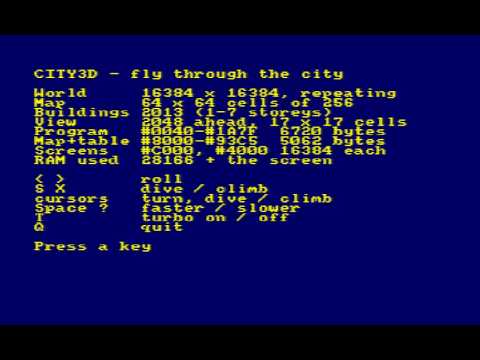
Lots more updates, I hope you like my City3D demo. note: the FPS is a bug, it’s fixed in the version on GitHub. It was also hard to film with my phone steady.

Music Witch Bias:

4 Likes

Really like that demo. Can it be controllable?

Sky Ranger comes to the CPC! Very impressive vector work.

Thanks, I thought it would be faster to not do hidden line removal - I am now having second throughts and will try a hidden line removal version - if i don’t have to draw 90% of building you cannot see, it should be faster.

CyborgOS is now created as a new project in there - it is very early stages, a few hours old - it allows you to run multiple CP/M type programs with a full 61KB each coded in NTC BASIC at the same time fully pre-emptive. I expect it to get faster, but it proved I can run multiple programs in different 64kb banks.

Instructions are here, you NEED at least 128kb to run a single 61kb program. 4mb in the current build gives 5 programs with lots of data, class and driver spots - but that’s being addressed. More than 5 are coming and more responsiveness coming.

1 Like

Today NTC BASIC has support for Spectrum Next as a target, multiple games provided as examples to enjoy and learn from.

The demo is being controlled by me

Hi,

I always like BASIC compilers for any 8 bit machine. Takes away a lot of the pain of having to write everything in assembly so, well done for your effort.

Will definitely give this a serious try but, I do have a quick question. How do I compile the Z80? Do I have to paste it into WinApe? Also, does this handle RSX extensions? It didn’t like one of my programs in which I build 2 RSX commands first (using DATA statements to poke the machine code) and then use them in the main BASIC program.

Thanks

Actually it’s browser-based, you type your programs in the browser (load ntc.html in your browser) - and that’s it to generate your assembler source - it is generated as you type. You then take that source, and build it with sjasmplus assembler on Windows, or Linux.

NTC BASIC – new targets, chip libraries and a game on two new machines

NTC BASIC now builds for 16 targets from one compiler, with Z80, 68000 and 45GS02 back ends.

NOTE: What are the ports that the Powergraph card is on for the CPC? And the MSX ones when used with the AMSDAP?

New targets

Z80:

  • msx – MSX1 / MSX2 / MSX2+ / turbo R cartridge ROM. The console uses the MSX’s own video chip, with 80 columns on an MSX2.
  • msxcard – MSX with a V9938 card at #88 for the console.
  • msx9990 – MSX with a V9990 (GFX9000, Video9000, Powergraph) for the console.
  • sc3000 – Sega SC-3000 (or an SG-1000 with the SK-1100 keyboard), as a cartridge ROM.
  • cpccard – Amstrad CPC with an MSX V9938 card through the AMSDAP adapter.
  • cpc9990 – Amstrad CPC with a V9990 (AMSDAP or the CPC Powergraph).

Non-Z80:

  • md – Sega Mega Drive / Genesis. NTC on the 68000, with its own keyword library. Classes: Vdp, Pad, Psg, StdIO, System.
  • m65 – MEGA65. NTC on the 45GS02. Classes: Vic (320x200, 256 colours, two buffers, sprites drawn by the CPU and DMA), Joy, Sid, StdIO, System.

New classes:

  • VDP (TMS9918 / V9938 / V9958) and V9990 for the MSX, the SC-3000, and every CPC platform through AMSDAP.
  • Keys (keys held down, joysticks) for msx and sc3000, as well as the CPC and Next.

hwlib – game libraries per chip (optional)

For native games you write for the hardware, not for a lowest common denominator. hwlib has one class per graphics chip, named after the chip, so a chip that’s in more than one machine has one library. Where a chip differs between machines, that’s handled inside the chip’s class at compile time.

  • Zxn – ZX Spectrum Next: 128 hardware sprites.
  • Cpc – plain CPC: masked software sprites, double buffered.
  • Asic – CPC Plus / GX4000: 16 hardware sprites.
  • Tms9918 – MSX1, SC-3000.
  • V9938 – MSX2.
  • V9990 – MSX GFX9000 and CPC V9990 boards.

They all share the same core calls (Init, Pattern, Put, Hide, Anim, Move, Bounds, Frame), plus each chip’s own extras on top. There are also StdIO consoles for the chips with no firmware, and Vec for 3D. All optional: add the ones you want to your project.

Each machine has two test programs. One bounces spinning balls using the chip’s own sprites. The other draws a filled, lit cube, with back faces removed and double buffering. Cube speeds in emulators:

  • Next: 49 a second
  • V9990: 10.5
  • CPC: 9.5
  • MSX2: 9
  • MSX1: 7.5

Not checked yet:

  • The CPC Plus builds haven’t run (no CPC Plus emulator to hand).
  • The CPC V9990 builds are build-only until the board’s port address is set.

CYBORG SWARM on the Mega Drive and the MEGA65

A Galaga-style shooter written in NTC BASIC, built for both machines from the same game logic. It has formations, dives, bonus stages, the tractor beam, capture, rescue and the dual fighter.

A bot plays 20,000 frames on each machine. Both reach stage 17 with no frames lost (Mega Drive 80,320 points, MEGA65 81,100). So far it has run in emulators only (Genesis Plus GX and Xemu), not on real hardware.

Fixes

  • The keyword library ROM (Library: ROM) builds again for the CPC platforms. The Next port added Next-only code to the shared memory code, and the ROM builder was leaving that whole section out. Program addresses in the ROM are unchanged.
  • All three regression suites pass: Z80 887/887, Mega Drive 13/13, MEGA65 13/13.
1 Like

Does it work for the 6128 ASIC? WinAPE crashes! I didn’t try a real 6128 Plus yet. Does it work on v9990? What ports is it on for CPC?

Now… if you make your game on CPC, why not also make it for MSX, Sega SC3000 and ZX Spectrum Next if most of the logic is the same? And the Megadrive too!

Added support for Colecovision to NTC BASIC. A few optimisations to make it take less precious RAM for cart games.

NTC BASIC is now hosted at Cyborg Unicorn - you don’t even need to install it.

1 Like