Games converted for the GX4000 (or created for) - The topic

I agree in principle. For homebrew games that already have an online distribution channel like itch.io, it makes sense to start by discussing the matter with the creator. This allows for a clear agreement on distributing a CPR conversion of the game either directly in the thread and the annual GX4000 conversion list maintained with @remax, or via a link to a webpage.

It can also encourage some developers to create a dedicated GX4000 version, rather than relying on a makeshift patch or having to forgo certain secondary features.

Ok then we can institute a rule that no game published on itch.io is attached here without prior and explicit permission to do so?

Yes, Imho, that’s the point. We discussed about this matter at amstrad.es some time ago. The final decission was to insert a link instead the downloads, what avoids to have to contact devs one by one. The cpr creator could send his files to the dev.

It seems to be a good rule :

  • when a new game or a new version of a homebrew game is available directly in CPR from the author, we insert a link instead of a direct download.
  • If no CPR/GX4000 version is available, we start by contacting the author to ask if he would be interested in developing a GX4000 version, or if he’s okay with a community member handling it via a patch. The author decides whether he wants the version distributed here or prefer a link to his webpage on itch.io or elsewhere, offering this new GX4000 version with the other ones.
2 Likes

There remains the question of the list. We can consider that from now, if a homebrew game isn’t released in this topic or if the author makes an express demand, the game will be listed as usual but with a link rather than a direct download. Of course it means that the game won’t be added in the fullset.

@remax, does it seem acceptable for you when we do the annual update?

That all sounds good. I will contact each of the developers whose games I have already converted and uploaded here to check if they’re OK with them being posted here and to see if they want to add the cpr files to their itch page.

1 Like

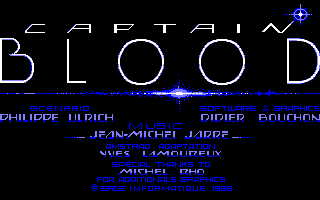
A huge shout-out to @LMK, who kindly agreed to patch this iconic game so it is finally fully playable on the GX4000, utilizing a PicoGX and its microSD-based save system :

CAPTAIN BLOOD

from ERE INFORMATIQUE / EXXOS

Controls:

  • J1B1 = Action
  • J1B2 = cut short planet flight over and hyperspace

Modifications for the GX4000 version:

  • All game keys patched,
  • Load/save feature using PicoGX cartridge

And Well, dear friends, here we are. With Captain Blood, we have now reached a milestone of 1,000 different games available to play on our beloved GX4000 :face_with_tongue: . And we’re far from finished :innocent: !

It is a real pleasure to celebrate this thousandth entry aboard the Captain Blood Ark. Honk, the Ark’s bio-consciousness, is positively brimming with emotion. Captain Blood has long been hailed as a landmark in video game history—one of the first French microcomputer games to achieve global success and, for us frog-leg eaters, a definite source of national pride.

For my part, I had spent years hoping to play this legendary game on the GX4000. Its gameplay is built around a graphical interface, and the dialogue relies on a unique icon-based system that allows Olga, the Ark’s translator, to interpret exchanges between Blood and the aliens. The only hurdle was remapping a single key to the joypad to skip certain sequences. However, until now, setting out to find the clones essential for the Captain’s survival was impossible due to the GX4000’s lack of a save system.

Since the game is multilingual, I highly encourage you to set off in pursuit of Blood’s clones, all while relaxing on your sofa or in your comfiest armchair, joypad in hand. To get off to a good start, the archive includes a save file that lets you begin the game in orbit around the planet of Yoko, an adorable, tie-wearing alien who wants to be your friend. While there are several ways to start the game, this particular setup is the easiest for exploring the game’s universe. Just copy the save file in your SAVES folder to load it from the game.

Take the time to discuss with the aliens, do them favors, and sometimes even outsmart them to obtain coordinates for new planets, locate clones, teleport them to the Ark, and absorb them to replenish Blood’s vital fluid. Blood is running out of time without this precious fluid; his degeneration is visible on-screen as his hand shakes increasingly violently, eventually making him impossible to control the Ark properly.

Captain Blood is finally available on a console system and it’s on GX4000 :grin: !

Captain_Blood.zip (116,1 Ko)

9 Likes

Wow! I haven’t played this in years, used to love exploring and chatting to the various aliens. Thank you so much for this patched version :smiley: (and for the included save).

It won’t let me edit older posts, so I’ve deleted the Babaliba and Casamiro posts as ESP Soft are happy that I made the .cpr files and have added them to their game pages (and we’d rather point visitors to their actual pages):

3 Likes

Whoa, the weekend is off to a great start! Thanks to the team for this masterpiece of 80s French gaming :heart_eyes:

1 Like

Whoa that’s impressive.

(Off topic, but I spent so much time as a kid looking at all the letters of this screen as a kid, especially the BLOOD ones, admiring and studying the dithering and colors)

All the credit goes to @LMK, who has perfectly mastered the PicoGX save system.

5 Likes

Great!! It seems working fine at CPC6128 classic with M4 card, but accessing the disk icon makes the game freeze. Could be possible patching this?

It freezes because the patch is to offer a GX4000 version. And the GX4000 doesn’t use the M4. Just uses the cracked version in its DSK version to save like on a floppy disk?

Oh, of course! I was only spinning plates with my stuff :smiley:

1 Like

Pedrisco - now saves on GX4000

I asked Vosges6128 if they could add score saving for PicoGX, and they did it.

So it now saves the hiscore and your game settings :slight_smile:

3 Likes

Thanks @ixien for posting up Captain Blood, I very much enjoyed the challenge of converting that to gx4000 and getting the save/load working. Although I never played the game as a youngster I really like its open world style and graphics, I think I would’ve really enjoyed it.

Having now converted a few games for gx4000 I thought I would write up a bit of a guide, as the one that does exist is a bit limited and outdated. However having written the first section I found it was getting a lot longer than I originally intended and has only scratched the surface. It’s over here Converting games for GX4000 - How to/FAQ ; if anyone is interested I am happy to write more.

2 Likes

Now, that i see there is a lot of new people here converting games.the forum is “new”, and many search new challenges.

I remember i want people to made a challenge,porting the russian levels from spectrum to the amstrad versión of laser squad.

I have:

the amstrad levels dissasembled(the general estructure)

the spectrum levels disasembled with the general estructure).

All spectrum .z80 snapshots from the russian levesl.

A protopype mounted of one level using a mix between spectrum+amstrad+rusian.

Echa level needs:

-Mount the basic levels.

-Change the sprites in amstrad part.

-Adapt the z80 code of the levels(found the memory adresses equivalences, and put the russian z80 code inside levels of amstrad).

-and make sure it doesn’t explode xD.

The idea was a made a cartridge with all levels for the gx4000, the amstrad+rusian ported levels from spectrum version.

5 Likes

David Programa replied to me and is happy for us to keep the .cpr files here, and he’s added them to his Itch pages.

3 Likes

Thanks! Anyway, there is no problem on keeping the files here also. Great job, by the way!

1 Like